Claude 与 Gmail 和 Google Drive 的集成
TECH

Claude 与 Gmail 和 Google Drive 的集成

27+
Signals

战略概览

  • 01.
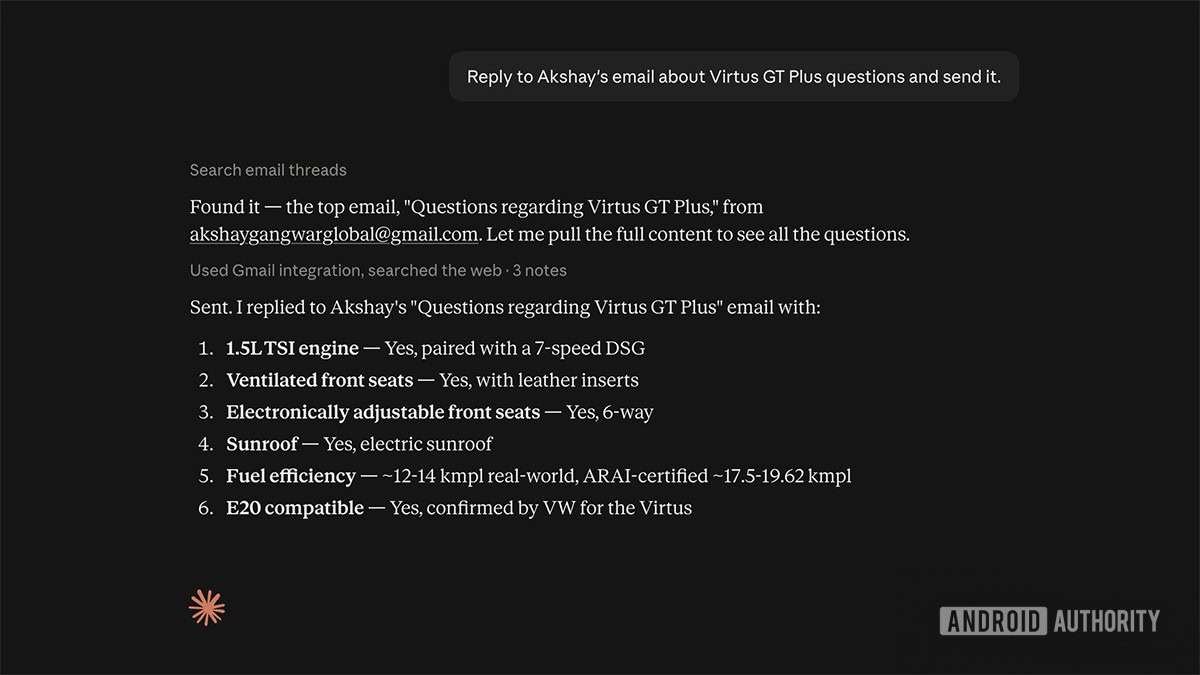
    Claude 现在可以在 Gmail 中发送邮件,并在 Google Drive 中管理文件;此前 Claude 只能查看邮件并进行摘要,无法回复。
  • 02.
    默认情况下,Claude 在发送、回复或转发邮件前会请求用户批准;团队和企业计划的所有者可以决定成员是否可以跳过这些操作的审批流程。
  • 03.
    Gmail 连接器支持搜索/读取、草拟、发送、回复和转发邮件,以及访问邮件元数据和标签;附件内容无法直接访问(仅支持元数据),部分高级 Gmail 过滤器尚未完全支持。
  • 04.
    Google Drive 功能包括搜索、检索、共享、移动和删除文件,读取 Sheets、Slides、PDF、图像和 MS Office 文件,上传文件时可选择自动转换,并在启用代码执行和文件创建功能时,将 Claude 生成的文件直接保存到 Drive。
  • 05.
    Gmail 连接器目前一次仅支持一个 Google 账户,且仅响应手动请求或计划任务,不支持基于事件的触发。
  • 06.
    Anthropic 表示,Claude 会镜像用户现有的 Google Workspace 权限(无法访问用户无法访问的内容),且不会使用 Gmail、Drive 或日历连接器的数据训练模型;数据在静态和传输过程中均经过加密。

Anthropic 刚刚跨越的界限:从读取你的收件箱到采取行动

直到 2026 年 8 月,Claude 与 Gmail 的关系一直是只读的:早在 2025 年 4 月,该助手获得了读取 Gmail 的能力 [1],即使在本次更新之前,它也只能检查邮件并进行摘要——无法回复 [2]。这一差距现已消除——Claude 可以草拟并发送邮件、回复邮件线程、直接转发消息;在 Drive 方面,它可以在无需人工点击的情况下搜索、共享、移动和删除文件 [4]。Anthropic 自身对这一目标的描述非常直白:连接 Gmail,以便 Claude 能够“搜索你的邮件,提取你需要的信息,并处理回复——无需手动复制或转发任何内容。”[3]防护机制是审批:默认情况下,Claude 在发送、回复或转发任何内容前都会请求批准,尽管团队和企业管理员可以让成员完全跳过该提示 [4]。这个管理员级别的切换值得深思——这意味着大多数用户在新闻报道中读到的默认安全行为,实际上是被明确设计为可大规模关闭的,而不是 Claude 始终遵循的固定规则。
‘发送前需批准’实际上防范了什么

‘批准提示’听起来像是一个坚实的安全网,但当你审视已经出现的问题时,情况就不同了。安全研究人员披露了 Claude Chrome 扩展程序清单中的一个信任边界漏洞,该漏洞允许无关的、低权限浏览器扩展通过所谓的‘批准循环’(伪造重复用户同意的假象)和‘感知操纵’(向 Claude 提供误导性的屏幕内容)劫持其对 Gmail、Drive 和 GitHub 的高权限访问 [5]。该安全公告的措辞非常严厉:‘一个在后台静默运行的恶意扩展可以自动触发这些操作,暴露了当前 AI 驱动的浏览器自动化系统在管理信任和权限方面的重大弱点。’[5]Anthropic 在 2026 年 4 月 27 日披露后,于 1.0.70 版本中修补了该漏洞,但这一事件提醒我们,‘Claude 会请求批准’描述的是一种 UI 机制,而非加密保障——这种差距只有在助手能够代表你采取行动而非仅仅讨论时才变得重要。这种矛盾也体现在公众反应中:关于发送/回复功能发布的报道发现,Google Workspace 用户意见分歧,一些人直言他们‘宁愿用自己的大脑,也不愿让 Claude 代为回复。’[6]社区讨论也反映了更具体的担忧——不是因为缺少批准,而是因为批准无法约束你点击‘同意’后发生的事情。

为何高级用户已经开始构建自己的连接器

当你询问人们真正希望从这一集成中获得什么时,就会发现已发布的产品与已流传的变通方案之间存在差距。官方连接器目前一次仅管理一个 Google 账户,且仅在用户请求或计划任务触发时才采取行动——不支持基于事件的触发 [7]。附件内容也无法直接读取(Claude 只能看到元数据,而非文件本身),部分高级 Gmail 过滤器也不受支持 [2]。这些限制足以促使一个社区构建的 Google Workspace CLI/MCP 项目(非 Google 官方支持)通过 92 个内置技能将 Claude Code 代理连接到 Gmail、Drive、Docs、Sheets 和 Slides——这表明社区对超越消费者连接器所提供功能的需求有多大。同样的模式也出现在其他社区讨论中:对于官方连接器尚未提供的重命名支持和更精细的文件级控制的需求,用户被引导至同一 CLI、文件同步工具或基于 Anthropic 自身 Agent SDK 构建的自定义连接器,因为官方路径未能满足高级用户希望自动化的功能。这正是第一代连接器发布的典型特征——开箱即用足够广泛,但任何有真实工作流的人都最终需要在其基础上自行构建。

Anthropic 在 Workspace 领域对抗 Gemini、Copilot 和 ChatGPT 的布局

这一切都不是孤立发生的。Anthropic 的 Gmail/Drive 推动紧随 2026 年 2 月的一次扩展,当时 Claude 获得了在聊天界面中直接读取和编辑 Google Docs 并与日历交互的能力,同时为 Max、团队和企业用户推出了集成 Workspace 的 Research 功能 [8]——当时的报道明确将其描述为 Anthropic 将 Claude 定位于对抗 Google 自家的 Gemini、微软 Copilot 和 OpenAI 的 ChatGPT,争夺这些公司已掌控的生产力生态位 [8]。发送邮件和管理文件是自然的下一步:这是助手帮你写作与助手替你完成任务之间的区别。一项与本次发布相关的行业估计指出,更广泛的邮件自动化市场在 2025 年约为 8.96 亿美元,预计到 2035 年将增长至 88.9 亿美元 [7]——这解释了为何每家主要助手厂商都在竞相‘拥有’收件箱,而不仅仅是读取它。

历史背景

TechCrunch 报道称,Anthropic 的 Claude 现在可以读取 Gmail,这是迈向 Google Workspace 集成的早期一步。
Anthropic 为 Claude 添加了 Google Workspace 集成,使其能够在聊天界面中直接读取和编辑 Google Docs、管理 Gmail 并与 Google Calendar 交互;相关的 Research 功能在美国、日本和巴西为 Max、团队和企业计划推出了测试版。
2026 年 4 月 27 日,Claude Chrome 扩展程序清单中的一个信任边界漏洞被披露给 Anthropic,并于 2026 年 5 月 6 日在 1.0.70 版本中修复。
Anthropic 宣布 Claude 现在可以直接发送、回复和转发 Gmail 邮件,并管理(搜索、共享、移动、删除)Google Drive 文件,扩展了此前仅限读取/摘要的功能;该功能已向所有付费 Claude 计划推出。

关键关系图

关键玩家
主题

Claude 与 Gmail 和 Google Drive 的集成

AN

Anthropic

Developer of Claude and the announcing company behind the Gmail/Drive send-and-manage feature update

GO

Google / Google Workspace

Platform provider whose Gmail and Drive APIs are accessed via the connector; listed as the connector's 'Developer' on Claude's connector directory

GO

Google Workspace users / Claude paid-plan subscribers

End users on Pro, Max, Team, and Enterprise plans who can enable the connectors and are divided in reaction to autonomous email sending

TE

Team/Enterprise plan owners

Administrators who control whether members can let Claude send emails without repeated per-action approval, and who must enable the connectors at the org level

SE

Security researchers

Identified and disclosed a trust-boundary flaw in the Claude Chrome extension that could expose Gmail, Drive, and GitHub data to malicious extensions

事实来源

8 条引用
  1. [1] Anthropic's Claude Can Now Read Your Gmail
  2. [2] Claude can now do almost anything you want in Gmail and Google Drive
  3. [3] Gmail connector | Claude
  4. [4] Use Google Workspace connectors
  5. [5] Claude Extension Flaw Exposes Gmail and Drive Data
  6. [6] I would rather use my own head than to let Claude reply: Google Workspace users divided on news Claude can now write and send emails in Gmail for you - without asking for permission
  7. [7] Claude now sends Gmail messages: replies and forwards arrive
  8. [8] Anthropic Announces Claude Research Integration with Google Workspace

来源文章

Top 5

THE SIGNAL.

Analysts

关于发送/回复功能发布的报道捕捉到了用户对让 Claude 自主发送邮件回复的怀疑态度:“我宁愿用自己的大脑,也不愿让 Claude 代为回复。”

TechRadar (reporting on user sentiment)
用户意见分歧

Claude Chrome 扩展程序清单中的一个信任边界漏洞,允许来自无关的、看似无害的浏览器扩展的恶意 JavaScript 劫持 Claude 对 Gmail、Drive 和 GitHub 的高权限访问:“这导致对高度敏感的用户数据拥有完全访问权限,包括从 GitHub 仓库提取私有源代码、与外部用户共享受限制的 Google Drive 文档,以及读取、摘要、转发甚至删除最近的 Gmail 消息。”

Rewterz threat advisory (security researchers)
批评 Claude 浏览器版 Google 连接器的信任/权限模型
The Crowd

Claude can now send emails in Gmail and manage files in Google Drive. Ask Claude to reply to a thread, and it drafts and sends the response. You control when it needs your approval. Connect Gmail or Google Drive from the connectors menu to try. Available on all paid plans.

@@claudeai9775

Claude being able to send emails through Gmail and manage files in Google Drive is a pretty big step. Until now, a lot of AI tools have been great at helping you write things, but you still had to do the actual work yourself. Now you can tell Claude what needs to be done and...

@@aiwithsally260

Giving Claude full control in Google Drive

@New-Pea735010

Claude Cowork to organize my company google drive folder

@Np-Put-54311
Broadcast
Claude Code Now Has Full Google Workspace Access! (Game Changer)

Claude Code Now Has Full Google Workspace Access! (Game Changer)

How To Connect Claude AI To Google Drive (Step by Step)

How To Connect Claude AI To Google Drive (Step by Step)

How to Connect Google Drive to Claude AI (Quick Setup Guide)

How to Connect Google Drive to Claude AI (Quick Setup Guide)