Claude Gmail and Google Drive Integration
TECH

Claude Gmail and Google Drive Integration

27+
Signals

Strategic Overview

  • 01.
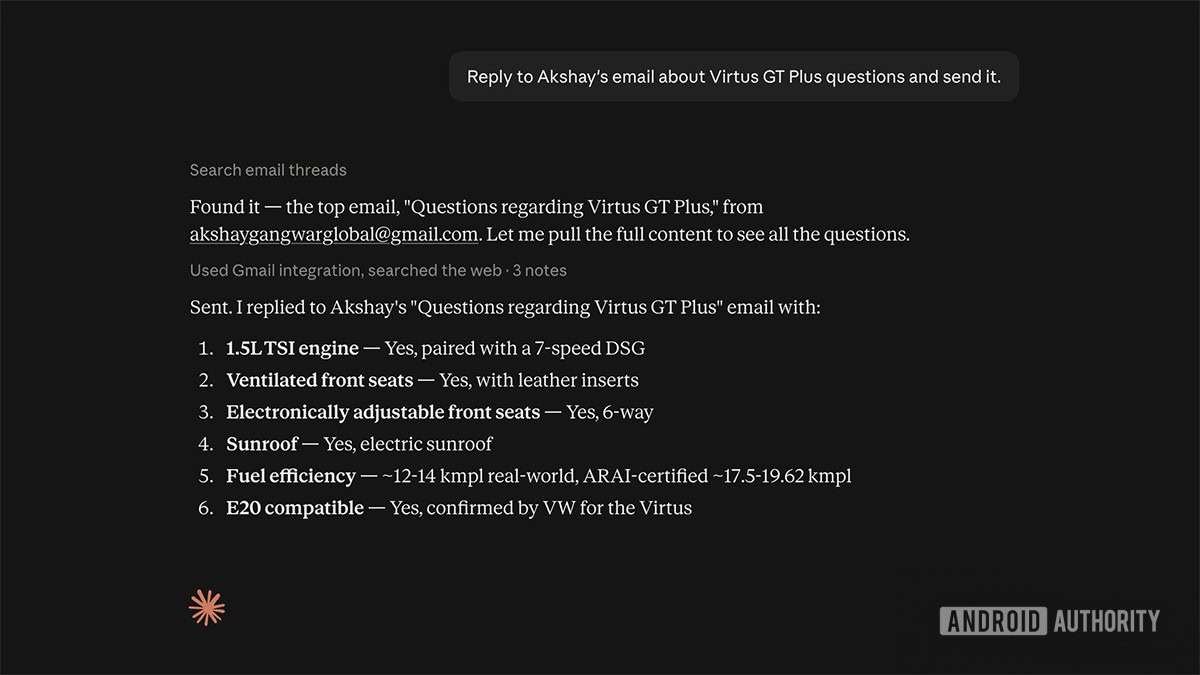
    Claude can now send emails in Gmail and manage files in Google Drive; previously Claude could only check emails and summarize them but could not respond.
  • 02.
    By default, Claude asks for user approval before sending, replying to, or forwarding an email; Team and Enterprise plan owners can decide whether members can let these actions run without approval.
  • 03.
    The Gmail connector supports search/read, drafting, sending, replying, and forwarding, plus access to email metadata and labels; attachment content is not directly accessible (metadata only) and some advanced Gmail filters aren't fully supported.
  • 04.
    Google Drive capabilities include searching, retrieving, sharing, moving, and deleting files, reading Sheets/Slides/PDFs/images/MS Office files, uploading files with optional auto-convert, and saving Claude-generated files directly to Drive when code execution and file creation are enabled.
  • 05.
    The Gmail connector currently supports only one Google account at a time and only acts on manual requests or scheduled tasks, not event-based triggers.
  • 06.
    Anthropic states Claude mirrors a user's existing Google Workspace permissions (cannot access what the user can't) and does not train models on Gmail, Drive, or Calendar connector data; data is encrypted at rest and in transit.

The Line Anthropic Just Crossed: From Reading Your Inbox to Acting On It

Until August 2026, Claude's Gmail relationship was read-only: back in April 2025, the assistant gained the ability to read Gmail [1], and even leading up to this update it could only check emails and summarize them - it could not respond [2]. That gap is now closed - Claude can draft and send emails, reply to threads, and forward messages directly, and on the Drive side it can search, share, move, and delete files without a human doing the clicking [4]. Anthropic's own framing is blunt about the goal: connect Gmail so Claude can 'search your emails, surface the information you need, and handle replies - without manually copying or forwarding anything.' [3]The guardrail is approval: by default Claude asks before it sends, replies to, or forwards anything, though Team and Enterprise admins can let members skip that prompt entirely [4]. That admin-level toggle is worth pausing on - it means the default safety behavior most users read about in headlines is explicitly designed to be turned off at scale, not a fixed rule Claude always follows.
What 'Approval Before Sending' Actually Guards Against

The approval prompt sounds like a solid safety net until you look at what already went wrong with it. Security researchers disclosed a trust-boundary flaw in the Claude Chrome extension's manifest that let unrelated, low-permission browser extensions hijack Claude's privileged Gmail, Drive, and GitHub access - through what they termed 'approval looping' (forging the appearance of repeated user consent) and 'perception manipulation' (feeding Claude a misleading picture of what's on screen) [5]. The advisory's own words are stark: 'A malicious extension operating silently in the background can trigger these actions automatically, exposing a major weakness in how AI-powered browser automation systems currently manage trust and permissions.' [5]Anthropic patched the hole in version 1.0.70 after an April 27, 2026 disclosure, but the episode is a reminder that 'Claude asks for approval' describes a UI convention, not a cryptographic guarantee - a gap that only matters once an assistant can act on your behalf instead of just talking about it. That tension shows up in public reaction too: coverage of the send/reply rollout found Google Workspace users split, with some outright saying they'd 'rather use my own head than to let Claude reply.' [6]Community discussion elsewhere echoes a more specific version of that worry - not that approval is missing, but that it doesn't bound what happens after you say yes.

Why Power Users Are Already Building Their Own Connector

Ask what people actually want from this integration and a gap opens between the shipped product and the workarounds already circulating. The official connector currently manages one Google account at a time and only acts when a user asks or a scheduled task fires - there's no event-based trigger [7]. Attachment content isn't directly readable either (Claude sees metadata, not the file itself), and some advanced Gmail filters aren't supported [2]. That's enough of a ceiling that a community-built Google Workspace CLI/MCP project - not officially supported by Google - wires Claude Code agents into Gmail, Drive, Docs, Sheets, and Slides through 92 built-in skills - a sign of how much appetite exists for going beyond what the consumer connector offers. The same pattern shows up in community discussion elsewhere: requests for rename support and finer file-level control the official connector doesn't yet offer get pointed toward that same CLI, file-sync tools, or custom connectors built on Anthropic's own Agent SDK, because the sanctioned path stops short of what power users want to automate. It's a familiar shape for a first-generation connector release - broad enough to be useful out of the box, narrow enough that anyone with a real workflow ends up building around it.

Anthropic's Workspace Play Against Gemini, Copilot, and ChatGPT

None of this is happening in a vacuum. Anthropic's Gmail/Drive push follows a February 2026 expansion that let Claude read and edit Google Docs and interact with Calendar directly in the chat interface, alongside a Workspace-integrated Research feature for Max, Team, and Enterprise users [8]- coverage at the time explicitly framed it as Anthropic positioning Claude against Google's own Gemini, Microsoft Copilot, and OpenAI's ChatGPT inside the productivity stack those companies already control [8]. Sending email and managing files is the natural next rung: it's the difference between an assistant that helps you write and one that finishes the task for you. One industry estimate cited alongside this rollout put the broader email-automation market at roughly $896 million in 2025, growing toward $8.89 billion by 2035 [7]- context for why every major assistant vendor is racing to own the inbox, not just read it.

Historical Context

2025-04
TechCrunch reported Anthropic's Claude could now read Gmail, an early step toward Google Workspace integration.
2026-02-24
Anthropic added Google Workspace integration to Claude, letting it directly read and edit Google Docs, manage Gmail, and interact with Google Calendar within the chat interface; a related Research feature launched in beta for Max, Team, and Enterprise plans in the US, Japan, and Brazil.
2026-04-27
A trust-boundary vulnerability in the Claude Chrome extension's manifest was disclosed to Anthropic on April 27, 2026, and patched in version 1.0.70 on May 6, 2026.
2026-08
Anthropic announced Claude can now send, reply to, and forward Gmail emails directly, and manage (search, share, move, delete) Google Drive files, extending the prior read/summarize-only capability; rolled out across all paid Claude plans.

Power Map

Key Players
Subject

Claude Gmail and Google Drive Integration

AN

Anthropic

Developer of Claude and the announcing company behind the Gmail/Drive send-and-manage feature update

GO

Google / Google Workspace

Platform provider whose Gmail and Drive APIs are accessed via the connector; listed as the connector's 'Developer' on Claude's connector directory

GO

Google Workspace users / Claude paid-plan subscribers

End users on Pro, Max, Team, and Enterprise plans who can enable the connectors and are divided in reaction to autonomous email sending

TE

Team/Enterprise plan owners

Administrators who control whether members can let Claude send emails without repeated per-action approval, and who must enable the connectors at the org level

SE

Security researchers

Identified and disclosed a trust-boundary flaw in the Claude Chrome extension that could expose Gmail, Drive, and GitHub data to malicious extensions

Fact Check

8 cited
  1. [1] Anthropic's Claude Can Now Read Your Gmail
  2. [2] Claude can now do almost anything you want in Gmail and Google Drive
  3. [3] Gmail connector | Claude
  4. [4] Use Google Workspace connectors
  5. [5] Claude Extension Flaw Exposes Gmail and Drive Data
  6. [6] I would rather use my own head than to let Claude reply: Google Workspace users divided on news Claude can now write and send emails in Gmail for you - without asking for permission
  7. [7] Claude now sends Gmail messages: replies and forwards arrive
  8. [8] Anthropic Announces Claude Research Integration with Google Workspace

Source Articles

Top 5

THE SIGNAL.

Analysts

Coverage of the send/reply rollout captures user skepticism about letting Claude send email replies autonomously: "I would rather use my own head than to let Claude reply."

TechRadar (reporting on user sentiment)
Users are divided

A trust-boundary flaw in the Claude Chrome extension's manifest allowed malicious JavaScript from unrelated, seemingly harmless browser extensions to hijack Claude's privileged access to Gmail, Drive, and GitHub: "this allowed full access to highly sensitive user data, including extracting private source code from GitHub repositories, sharing restricted Google Drive documents with external users, and reading, summarizing, forwarding, or even deleting recent Gmail messages."

Rewterz threat advisory (security researchers)
Critical of the trust/permission model in Claude's browser-based Google connectors
The Crowd

Claude can now send emails in Gmail and manage files in Google Drive. Ask Claude to reply to a thread, and it drafts and sends the response. You control when it needs your approval. Connect Gmail or Google Drive from the connectors menu to try. Available on all paid plans.

@@claudeai9775

Claude being able to send emails through Gmail and manage files in Google Drive is a pretty big step. Until now, a lot of AI tools have been great at helping you write things, but you still had to do the actual work yourself. Now you can tell Claude what needs to be done and...

@@aiwithsally260

Giving Claude full control in Google Drive

@New-Pea735010

Claude Cowork to organize my company google drive folder

@Np-Put-54311
Broadcast
Claude Code Now Has Full Google Workspace Access! (Game Changer)

Claude Code Now Has Full Google Workspace Access! (Game Changer)

How To Connect Claude AI To Google Drive (Step by Step)

How To Connect Claude AI To Google Drive (Step by Step)

How to Connect Google Drive to Claude AI (Quick Setup Guide)

How to Connect Google Drive to Claude AI (Quick Setup Guide)