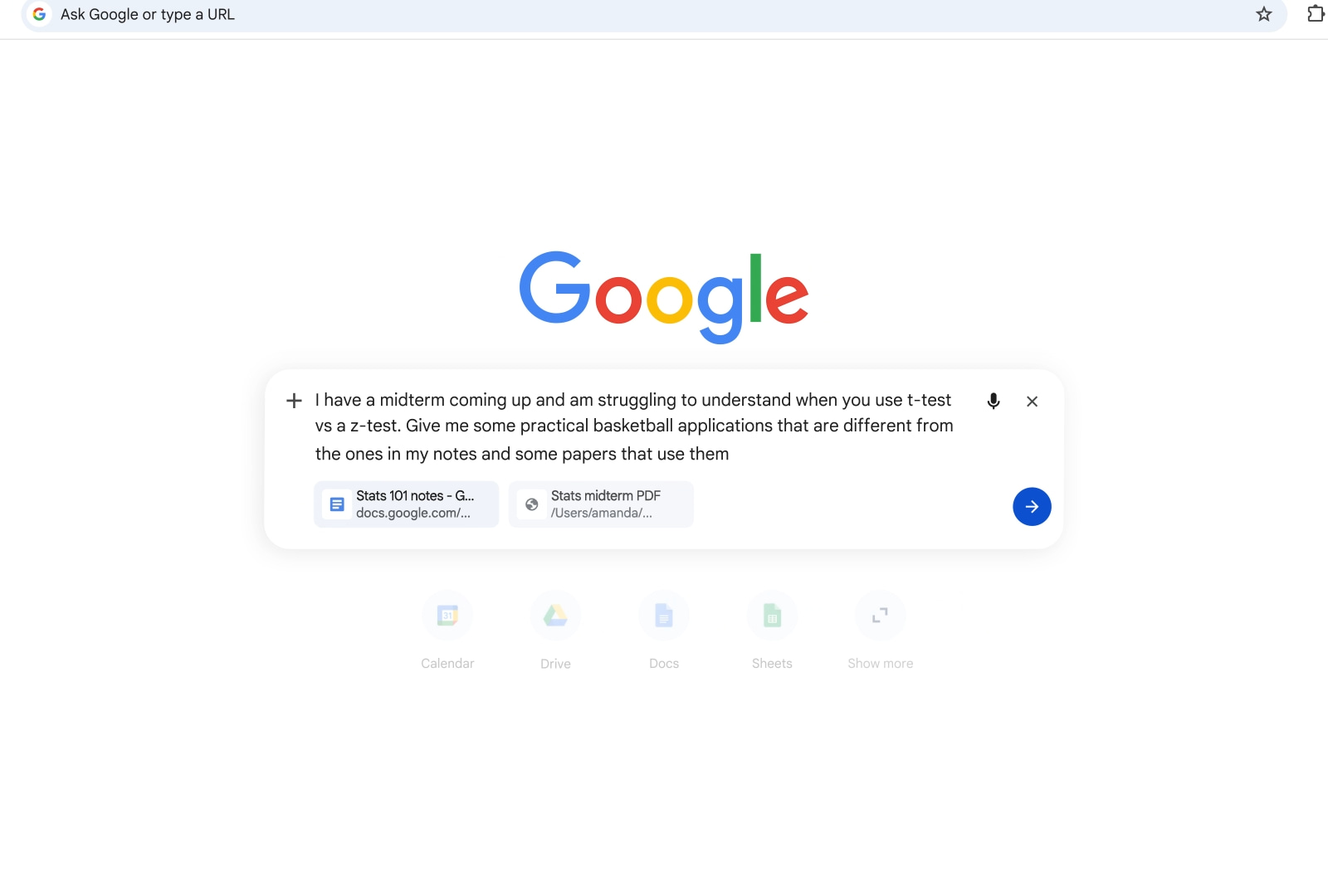
Google Chrome Gemini AI updates
TECH

Google Chrome Gemini AI updates

43+
Signals

Strategic Overview

  • 01.
    Google rolled out side-by-side AI Mode browsing on Chrome desktop: clicking a link from an AI Mode response opens the webpage next to the conversation so users can ask follow-ups without losing context.
  • 02.
    A new plus-menu lets users mix and match recent tabs, images, and files as context for a single AI Mode search, on both Chrome desktop and mobile.
  • 03.
    Two days earlier, Google launched Chrome Skills — saved, reusable Gemini prompts invoked via '/' or '+' in the Gemini side panel, with a prebuilt library for tasks like shopping comparisons, recipe macros, and document scanning.
  • 04.
    Skills and the AI Mode updates are available to all Chrome users (not limited to paid AI Pro/Ultra plans) on Mac, Windows, and ChromeOS with Chrome language set to English-US, rolling out first in the U.S.

From Chatbot Sidebar to Agentic Workflow Platform

The most consequential thing about this week's updates is not any single feature — it is the category shift they add up to. Chrome's original Gemini integration in September 2025 was essentially a floating chatbot: ask a question, get an answer, close the window. Chrome Skills rewrites that interaction model. A Skill is a saved prompt that can read the current page, pull in other open tabs, and execute a repeatable task — Google's own examples include comparing shopping options across tabs, computing recipe macros, and scanning documents. Saved Skills run on the current page 'along with any other tabs' a user selects, and Google is seeding a prebuilt library of ready-made Skills users can add and customize.

Search Engine Journal captured the shift bluntly: 'A saved prompt that reads a page, compares it against two other open tabs, and drafts a summary email through a connected app is closer to a lightweight automated workflow than a chatbot conversation.' Combined with the April 16 AI Mode updates — persistent side-by-side chat and a plus-menu that mixes tabs, images, and files as search context — Chrome is quietly becoming an automation surface, not just a place to type questions.
The Competitive Squeeze on Atlas, Comet, Dia and Claude for Chrome

Timing is the story here. OpenAI launched ChatGPT Atlas and Perplexity made Comet free worldwide in October 2025; Anthropic's Claude for Chrome and The Browser Company's Dia added to the pile. Every one of those products asks users to adopt a new browser — abandoning bookmarks, extensions, passwords, and muscle memory. Google's counter-move is to ship the same capabilities inside the browser 3.83 billion people already use.

Tom's Guide's Amanda Caswell put the user-side implication plainly: 'I don't actually need a dedicated AI browser anymore. Google has effectively turned Chrome into one.' The New Stack is more skeptical, describing Skills as Google playing catch-up — 'mostly a way to save a prompt you may want to regularly reuse' — but even that framing concedes the strategic point. Crucially, Skills are available to all Chrome users, not just AI Pro or Ultra subscribers. That is a deliberate choice: the earlier January 2026 Auto-Browse agentic feature was gated to paid plans, but Skills drops the paywall. Google is trading monetization for reach, precisely because the threat is not revenue — it is losing the default-browser position entirely.

User Backlash Google's Blog Posts Won't Mention

Beneath the official marketing, the r/chrome community is surfacing two frictions that the launch posts skate over. The first is privacy: a trending thread titled 'Chrome now has Gemini baked in and I genuinely don't know if I should be scared' describes Gemini's AI Mode surfacing on banking and other sensitive pages, generating a long discussion thread of unease about where the assistant can and cannot see. The second is a power-user UX regression: another thread titled 'TAB key for AI Mode is driving me insane' documents that pressing Tab in the address bar now triggers AI Mode instead of the decades-old URL autocomplete behavior, with a chrome://flags toggle as the only workaround.

Neither complaint is theoretical — they reflect the cost of welding an AI layer onto a browser whose existing conventions users have internalized. Sentiment elsewhere is warmer: official Chrome announcements on X and hands-on walkthroughs on YouTube lean enthusiastic, particularly on Skills and side-by-side as productivity wins. But the Reddit tension points to a real audit Google hasn't publicly addressed: when every tab, including sensitive ones, becomes potential AI context, the trust surface expands with it.

Safety Guardrails for an Agent With Your Tabs

Skills are not passive — they act. Google's own launch post notes a Skill can compare pages across tabs, draft emails, and invoke connected apps, which means a malicious or malformed prompt could do real damage. Google's stated mitigation is twofold: Skills prompts ask for confirmation before taking sensitive actions, and the feature inherits Chrome's layered protections, which the company says include automated red-teaming against prompt-injection and misuse.

This matters because agentic browsing is where AI safety gets real for consumers — not in API benchmarks, but in whether a saved Skill can be tricked by text embedded on a webpage into exfiltrating data or sending the wrong email. The confirmation-gate design is a conservative choice compared to the more aggressive autonomous posture of some competitors, and it is consistent with how Google gated January's Auto-Browse to paid plans initially. The trade-off: friction now, fewer incidents later. Whether users tolerate the confirmation prompts or disable them en masse will determine how quickly Skills evolves from a prompt library into a true autonomous agent layer.

Why English-US and Why Now

A detail buried in the rollout notes deserves more attention: both Skills (April 14) and the AI Mode side-by-side update (April 16) are gated to U.S. users with Chrome language set to English-US, on Mac, Windows, and ChromeOS. That is a narrower rollout than Gemini's earlier Chrome integrations, and it reveals where Google is prioritizing.

The U.S. is where Atlas, Comet, Dia, and Claude for Chrome compete most directly for mindshare — it is the market where Google most needs to defuse the 'AI browser' narrative before it ossifies. English-US also lets Google control the quality of Skills' output and the safety behavior of agentic actions in a linguistically homogeneous pool before exposing the system to the edge cases of other locales. For the rest of the world, this means waiting — Google says only that it will 'expand soon to more places' — and for non-English Chrome users, it means watching the competitive AI-browser fight play out in a market they are not yet inside. That staging pattern, U.S.-first then global, is the same one Google used for January's Auto-Browse, and it is now the default shape of Chrome's AI rollouts.

Historical Context

2025-09
Google initially introduced Gemini to Chrome, with the assistant living in a floating window.
2025-10
OpenAI launched ChatGPT Atlas and Perplexity made Comet free worldwide, intensifying competitive pressure on Chrome.
2026-01-28
Google moved Gemini into a persistent Chrome sidebar and introduced agentic Auto-Browse for AI Pro and Ultra subscribers in the U.S.
2026-04-14
Google launched Chrome Skills — saved, reusable Gemini prompts with a prebuilt library — available to all Chrome desktop users in English-US on Mac, Windows, and ChromeOS.
2026-04-16
Google launched side-by-side AI Mode browsing and multi-tab/image/file context for AI Mode on Chrome desktop and mobile in the U.S.

Power Map

Key Players
Subject

Google Chrome Gemini AI updates

GO

Google

Developer of Chrome and Gemini; rolling out AI Mode side-by-side browsing, multi-tab context, and Chrome Skills to defend Chrome's dominance against AI-native browsers.

MI

Mike Torres

Vice-president of product for Chrome — positioned the updates as part of Google's broader effort to bring practical AI capabilities to its web browser.

OP

OpenAI (ChatGPT Atlas)

Competing AI-native browser; a primary source of competitive pressure prompting Chrome's deeper Gemini integration.

PE

Perplexity (Comet) and The Browser Company (Dia)

Research-focused AI browser competitors whose feature sets Google is now replicating natively in Chrome.

CH

Chrome desktop users in the U.S.

Initial audience for the rollout — must be signed in on Mac, Windows, or ChromeOS with Chrome language set to English-US.

THE SIGNAL.

Analysts

"Argues Gemini 3 inside Chrome eliminates the need for migration to dedicated AI browsers like Atlas or Comet because Google upgraded the browser users already have. Quote: 'I don't actually need a dedicated AI browser anymore. Google has effectively turned Chrome into one.'"

Amanda Caswell
AI Editor, Tom's Guide

"Frames Skills as a shift from conversational AI to lightweight, multi-tab automated workflows — a structural change in how Chrome's AI is used. 'A saved prompt that reads a page, compares it against two other open tabs, and drafts a summary email through a connected app is closer to a lightweight automated workflow than a chatbot conversation.'"

Search Engine Journal analysis
Industry publication

"Views Skills as Google playing catch-up to Claude for Chrome, Atlas, and Dia, but notes availability to all users (not just AI Pro/Ultra) significantly broadens the feature's reach. Characterizes it as 'mostly a way to save a prompt you may want to regularly reuse.'"

The New Stack analysis
Developer-focused tech publication

"Reported that side-by-side browsing and multi-tab context reduced tab-switching fatigue and improved focus during AI-assisted research. 'Our early testers loved that they didn't have to constantly switch tabs to get help with a comprehensive article or a long video.'"

Google early testers
Pre-launch testers cited by Google and TechCrunch
The Crowd

"A new Search experience in Chrome is here. Dive deeper without losing your place! When you click a link in AI Mode in Chrome on your computer, the webpage opens side-by-side with your conversation so you can easily ask follow ups. Bring context like open tabs, files and..."

@@googlechrome213

"Keep tabs on our latest Chrome feature, coming soon: Skills! Save your go-to Gemini in Chrome prompts to reuse them later, or choose from a library of premade prompts."

@@googlechrome1200

"Google just made AI WAY easier in Chrome. Now you can: Save prompts as reusable 'Skills'; Trigger them with 1 click (+ or /); Compare products, summarize docs, plan meals instantly. And that's not all... AI can now design app previews for you -> Just describe it -> Get..."

@@TechieUltimatum109

"A new way to explore the web with AI Mode in Chrome"

@u/Gaiden20622
Broadcast
NEW Gemini in Chrome Updates | Hands on with the Latest Chrome AI Features

NEW Gemini in Chrome Updates | Hands on with the Latest Chrome AI Features

Google New Gemini Skillz Turn Chrome Into an AI Beast

Google New Gemini Skillz Turn Chrome Into an AI Beast

Using Chrome's new AI features (one take, no cuts)

Using Chrome's new AI features (one take, no cuts)